By Adam Thierer & Berin Szoka
The goal of our “Privacy Solution Series,” as we noted in the first installment, is to detail the many “technologies of evasion” (i.e., user-empowerment or user “self-help” tools) that allow web surfers to better protect their privacy online—and especially to defeat tracking for online behavioral advertising purposes. These tools and methods form an important part of a layered approach that, in our view, provides an effective alternative to government-mandated regulation of online privacy.
In this second installment in this series, we will highlight Adblock Plus (ABP), a free downloadable extension for the Firefox web browser (as well as for the Flock browser, though we focus on the Firefox version here).
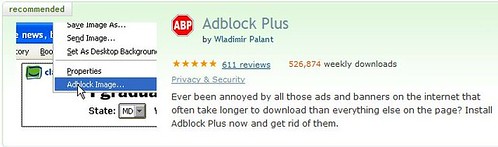
Purpose: The primary purpose of Adblock Plus is to block online ads from being downloaded and displayed on a user’s screen as they browse the Web. In a broad sense, this functionality might be considered a “privacy” tool by those who consider it an intrusion upon, or violation of, their “privacy” to be “subjected” to seeing advertisements as they browse the web. But if one thinks of privacy in terms of what others know about you, Adblocking is not so much about “privacy” as about user annoyance (measured in terms of distracting images cluttering webpages or simply in terms of long download times for webpages). In this sense, ABP may not qualify as a “technology of evasion,” strictly speaking. But, as explained below the fold, ABP does allow its users to “evade” some forms of online tracking by blocking the receipt of some, but not all, tracking cookies.
Cost: Like almost all other Firefox add-ons, both the ABP extensions and the filter subscriptions on which it relies (as described below) are free.
Popularity / Adoption: While there are a wide variety of ad-blocking tools available, Adblock Plus is far and away the leader. ABP has proven enormously popular since its release in November 2005 as the successor to Adblock, which was first developed in 2002 and reached over 10,000,000 downloads before being abandoned by its developer and even today garners nearly 40,000 downloads a week. This history of Adblock provides further details.
ABP was named one the 100 best products of 2007 by PC World magazine and is now the #1 most downloaded add-on for Firefox with over 500,000 weekly downloads, up significantly for just a few months. In a blog post last month, ABP creator Wladimir Palant estimated that “no more than 5% of Firefox users have Adblock Plus installed,” but that percentage is bound to grow larger as more people discover Adblock. As one indicator of ABP’s popularity, the number of Google searches for “Adblock” has nearly eclipsed the number of searches for “identity theft,” which seems like a far more serious concern than having to look at web ads.
Of course, not every Firefox user would chose to use Adblock even if they were aware of it. For example, one of us (Berin) finds it indispensable and leaves it on all the time. The other (Adam) almost never turns it on, preferring to see what sort of ads are being served on each page he visits. For those users primarily concerned with having their browsing tracked, there are other tools more effective than ABP for that purpose, as future entries in this series will describe.
This raises a point we make in our upcoming paper on online advertising and privacy: Internet users all have different preferences and sensitivities when it comes to ads and online privacy. Some of us find ads annoying, intrusive, and potentially privacy-violating. Others of us just don’t care or even find some informational benefit in seeing them—especially when they are tailored to our particular interests. Fortunately, tools like Adblock Plus let us each decide for ourselves what sort of browsing experience and privacy protections to use—rather than relying on the heavy, clumsy hand of Big Government to impose sweeping regulations that make a one-size-fits-all determination for everyone.
How Adblock Plus Works: Adblock Plus on its own offers nothing more than the capability to filter certain elements (images, external scrips, frames, Flash, etc.) sent to the user’s computer when they attempt to download the contents of a webpage. Unbeknownst to many users, the HTML code of most webpages includes instructions to download images and other content (such as ads) stored on that website or on third party sites. ABP does not recognize ad images as such, so it cannot automatically distinguish ads from non-ad content. Instead, ABP relies on a blacklist of terms that the keeper of the list has determined correspond to parts of a URL used to load ads. The following screenshot illustrates how ABP works:
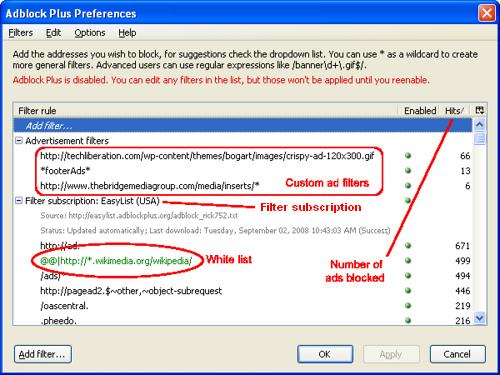
The user here (Berin) subscribed to EasyList USA, the most commonly-used U.S. “filter” (blacklist + whitelist) when he first installed AdBlock. (Additional filter subscriptions are available here.) The “filter rules” are ranked by “Hits” or number of ads blocked since the filter was installed (in May 2008). Shown here are only the top examples of effective filters, such as any URL that begins with “http://ad.” or contains “/ads/”. Also shown here are three custom ad filters created by Berin. This clip (click on “Show me how this is done”) illustrates how users can block images to create their own custom ad filter. Last, the green text is just the most commonly-applied filter rule contained in EasyList’s white list of terms that should not be blocked, trumping black list filters. For example, htttp://wikimedia.org/wikipedia/ads/… would normally be blocked because of the “/ads/” filter rule in the blacklist, but the green white list filter rule in our example trumps that rule to make sure that all URLs containing “htttp://*.wikimedia.org/wikipedia” (where * is a wild card operator) will not be blocked.
As mentioned above, ABP can block the downloading of some tracking cookies by preventing the user’s computer from attempting to download an element (usually an image) associated with that cookie—called “web bugs” or “web beacons.” As Wikipedia explains:
Originally, a Web bug was a small (usually 1×1 pixel) transparent GIF or PNG image (or an image of the same colour of the background) that was embedded in an HTML page, usually a page on the Web or the content of an e-mail. Modern Web bugs also use the HTML IFrame, style, script, input link, embed, object, and other tags to track usage. Whenever the user opens the page with a graphical browser or e-mail reader, the image or other information is downloaded. This download requires the browser to request the image from the server storing it, allowing the server to take notice of the download. As a result, the organization running the server is informed when the HTML page has been viewed.
Larger Implications: As you can imagine, advertising networks and advertisers are less than thrilled about the idea of users blocking their ads, but it is website operators that have thus far objected most strongly to ad-blocking, because it threatens what is for many websites the only source of revenue. Even amateur sites that do not have to pay for content production often rely on advertising revenue to cover other costs, such as hosting. It’s not hard to imagine why many site operators might want to discourage or thwart ad-blocking to maintain the quid pro quo of the online economy: Users get free content and services from websites in exchange for looking at advertising, which websites can sell through ad networks to advertisers. This dilemma is not unique to the online world, of course. In the offline context, television advertisers have responded to ad-skipping via DVRs through increasing reliance on product placement.
But because web-browsing is an essentially interactive experience between the user’s browser and the website, website operators may have greater leverage in the relationship with a user who wants to block ads. In particular, the website may be able to detect the use of ABP, at least indirectly through the pattern of page element blocking caused by ABP’s use. (Prior to June 2008, websites could directly detect whether a browser was using ABP by noticing the presence of an API interface designed to allow ABP to work with other extensions, but this feature was removed in a recent update to ABP.)
Thus, once adblocking rises above a certain “acceptable loss” threshold, a website could respond in at least three distinct ways:
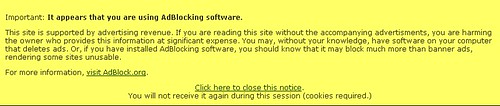
- Moral exhortation – websites might display this kind of pop-up notice to ABP users:
- “Blocking” adblocking – Because ABP’s relies on relatively crude keyword filters to distinguish ad elements of a page from content elements, websites can confuse these filters by making advertisements less easily distinguishable from content. On the one hand, websites might attempt to “embed” advertisements a la television product placement. On the other, we may see ad networks rely more on distributing ads through websites directly, rather than from ad network servers, so that adblocking filters cannot easily identify ads by the source referenced in their URL.
- Tying website functionality to the acceptance of tracking cookies – As mentioned above, Adblock will block some “tracking cookies” by blocking the downloading from ad network servers of web beacons—which is often how such cookies are placed on the uer’s computer in the first place. By requiring the downloading of those cookies to access the full functionality of the site, websites might be able to require users to accept tracking cookies in exchange for full access to the site.
As is so often the case, this will likely result in a war of “spy v. spy,” whereby the user community develops better evasive measures, and the websites community develops better countermeasures, and so on–as illustrated in this scene from the 1998 Marky Mark cult-classic film, The Big Hit: (Warning: Includes foul language).
http://www.youtube.com/v/xJ0FSQF7cGk&hl=en&fs=1Related Reading & Links
- Download Adblock Plus for Firefox (ver. 0.7.5.5)
- Adblock for Flock browser
- Adblock Plus main page (English language version)
- Adblock Plus blog
- How to disable Adblock Plus on your bookmarked pages (i.e., create a whitelist for accepted ads)
- Wikipedia entry
- Interview with Adblock creator Wladimir Palant
- New York Times article: Noam Cohen, “Whiting Out the Ads, but at What Cost?” New York Times, September 3, 2007.
- Nick Carr on Adblock: “What Would Jesus Do?” (and Wladimir Palant’s response to such criticisms)
- YouTube demo videos: http://www.youtube.com/v/RAYtLA1ZKW0&hl=en&fs=1 http://www.youtube.com/v/vl4_NEiyVIk&hl=en&fs=1


 The Technology Liberation Front is the tech policy blog dedicated to keeping politicians' hands off the 'net and everything else related to technology.