Randall Stross discusses his recent book: The Launch Pad: Inside Y Combinator, Silicon Valley’s Most Exclusive School for Startups. Stross’s behind-the-scenes look at Y Combinator details how the seed fund has been able to produce young entrepreneurs and successful startups such as Dropbox and Airbnb. Stross also discusses Y Combinator’s early history, the typical Y Combinator participant, the fund’s rate of return, the gender gap in the program, and the reason Silicon Valley has become the epicenter for startups.
Download
Related Links
Business Insider reports that, sometime next year, Scribd will launch a “seamless” interface that allows users to access Scribd docs on their Kindles. That’s a major step forward for the startup, which aims to be the “YouTube for print”—and which Adam and I use to make all our PFF papers available online in an embeddable Flash viewer that’s much quicker to load than the full PDFs. But it also represents a serious potential long-term challenge to Amazon, since Scribd is “quietly developing a strong e-book storefront to match its hoard of user generated content,” as Business Insider notes, and because:
If Scribd can put its books on the Kindle, this number should only grow, especially since it offers publishers a better business deal than Amazon. Amazon reportedly offers a 50/50 sales split. Scribd only keeps 20% and allows publishers to set their own price.
So much for “The coming Kindle monopoly” the cranks over at Oligopoly Watch warn us about!
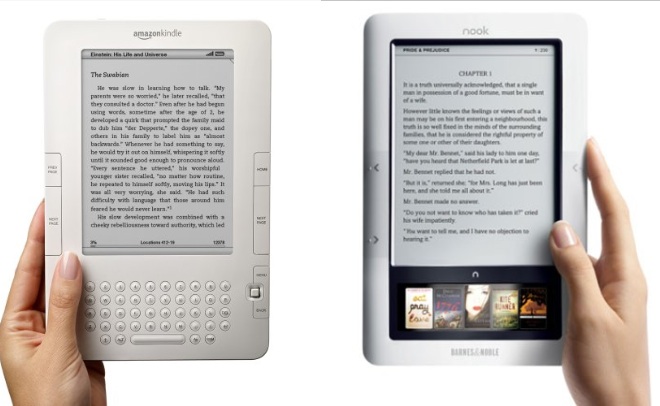 It would be more accurate to say that Scribd will be “Kindling” e-book competition within the base of Kindle users, and of course, competing devices like Barnes & Noble’s Nook offer cross-platform competition, just as satellite television competes with cable. In both cases, the platform operator has a strong incentive to compete for users by offering as much content (books/video programming) as possible at attractive prices.
On the one hand, one might say that inter-platform competition is stronger in the case of video delivery platforms, because users generally lease equipment on a month-to-month basis, while e-book users must buy their $250+ device up-front (making it therefore harder to switch from Amazon to Barnes & Noble, if one decides one doesn’t like the offerings or prices for e-books on the Kindle). But on the other hand, if Scribd can compete head-to-head with Amazon in offering e-books on Amazon’s Kindle (and perhaps on the Note, too, someday soon), users don’t need to switch devices at all: They can just switch e-book providers. Furthermore since e-books are bought on an à la carte basis, users don’t have to switch completely, they can just switch for any particular book—meaning that Amazon needs to compete for every additional purchase they can get, which means lower prices and more choices for consumers.
Continue reading →
First, let me just thank all the TLF readers who actively participate by commenting on the site. We really value your participation in this community built on a shared interest in technology policy!
Readers who visit the site will notice two new badges at the top righthand corner of the site for the TLF’s Twitter and Facebook pages. Please take a moment to follow us on Twitter and to become a fan of our Facebook page—and to “share” that page with your friends on Facebook. Of course, we also have RSS feeds for the blog and the Tech Policy Weekly podcast (RSS or iTunes), which should again become more “weekly” this year.
I’d love to hear any ideas any TLF readers might have about how to increase the site’s readership or upgrade its functionality. With the TLF’s five year anniversary coming up this August, we’re looking for ways to make the most of the blog as a tool for “keeping the politicans’ hands off the ‘net and everything else related to technology.”
Two quick tech tips for using the site. First, regarding Disqus (“Discuss”), our Comment Management System: If you haven’t already done so, don’t forget to “claim” comments made with your email address. As Disqus explains, this will help ensure that no one else posts a comment under your name (something only someone as dastardly as, say, Jim Harper might do):
If you’ve made a comment on a blog using Disqus, you automatically have a profile. To claim the comments and profile, verify your identity by clicking “Claim” on the profile. Once the profile is claimed, no one else will be able to use that profile or email address to comment aside from you.
Second, Adam and I often post PDFs in our posts using the nifty iPaper viewer provided by Scribd (for example here). Because it’s Flash, this tool allows you to see a PDF embedded on a page without having to download it or wait for the whole document to load. A few of our crochetier TLF colleagues have complained that the Flash viewer is too small to read easily. The simple solution is to click the rectangle-in rectangle button at the top right corner of the Scribd viewer, which will instantly expand the viewer to full-screen. If clicked again, the viewer will revert to its original size. This feature doesn’t seem to be as self-explanatory as the folks at Scribd assume.
Again, thanks for reading and for your feedback!
When people ask me why I do what I do for a living — and, more specifically, why I focus all my attention on digital media and technology policy — I often respond by showing them the new gadgets or software I am playing with at any given time. I just love digital technology. I am swimming in a sea of digital gadgets, consumer electronics, online applications, computing software, video games, and all sorts of cyber-stuff.
Anyway, even though this is a technology
policy blog, I sometimes highlight new digital toys or applications that have changed my life for the better. As the year winds down, therefore, I thought I would share with you five technologies that improved my life and productivity in 2008. I’d also love to hear from all of you about the technologies that you fell in love with this year in case I might have missed them. Here’s my list:
#1) Naturally Speaking 10:
 Thanks to Nate Anderson’s outstanding review over at Ars Technica, I finally made the plunge and bought Dragon Naturally Speaking 10 earlier this month. Wow, what a life-changer. I had played around with an earlier version of this market-leading speech recognition technology and found it somewhat clunky and unreliable. But Ver. 10, has ironed out almost all the old problems and become an incredibly sophisticated piece of software in the process. I love the way I can use simple voice commands to navigate menus in Microsoft Word and in Firefox. Perhaps best of all, I can dictate random rants into a pocket recording device and then upload them to Naturally Speaking (via a USB connection) and have them instantly transcribed. I’m even composing blog entries like this using it! Only problem is inserting HTML code; that’s still a hassle. Also, I find that switching from one input device to another definitely affects the quality of the transcription. Once you “train” Naturally Speaking using one device, it makes sense to stick with it. It’s not just the quality of the microphone; it’s also the proximity to your mouth that makes a difference. Regardless, this is one great product and, best of all, it’s should help save my rapidly-aging hands from becoming prematurely arthritic! All those years of video games and keyboards have taken their toll.
Continue reading →
Thanks to Nate Anderson’s outstanding review over at Ars Technica, I finally made the plunge and bought Dragon Naturally Speaking 10 earlier this month. Wow, what a life-changer. I had played around with an earlier version of this market-leading speech recognition technology and found it somewhat clunky and unreliable. But Ver. 10, has ironed out almost all the old problems and become an incredibly sophisticated piece of software in the process. I love the way I can use simple voice commands to navigate menus in Microsoft Word and in Firefox. Perhaps best of all, I can dictate random rants into a pocket recording device and then upload them to Naturally Speaking (via a USB connection) and have them instantly transcribed. I’m even composing blog entries like this using it! Only problem is inserting HTML code; that’s still a hassle. Also, I find that switching from one input device to another definitely affects the quality of the transcription. Once you “train” Naturally Speaking using one device, it makes sense to stick with it. It’s not just the quality of the microphone; it’s also the proximity to your mouth that makes a difference. Regardless, this is one great product and, best of all, it’s should help save my rapidly-aging hands from becoming prematurely arthritic! All those years of video games and keyboards have taken their toll.
Continue reading →

 The Technology Liberation Front is the tech policy blog dedicated to keeping politicians' hands off the 'net and everything else related to technology.